Wednesday, March 24, 2010

OBJECTIVE: I will review with "Win a Million."

ASSIGN YOURSELF: "How to Cite a Site"- rough draft using handout.-TEST TUESDAY!!!
DO NOW: REVIEW
AGENDA:
1) TECHCONNECT-PLAGIARISM, 
2) STUDY BUDDY -CHECK
3) VOCABULARY-

Sunday, March 21, 2010

MONDAY,TUESDAY


OBJECTIVE: I will begin my next project in Techconnect.

ASSIGN YOURSELF: Quiz Monday not Thursday we will be meeting Wednesday and Thursday in Ms. Meyers room. Project Due Next Thursday!(20 TERMS use each word in a sentence and draw a picture) -ONLY THOSE STUDENTS WHO DID NOT TURN IN CLASS TODAY.

DO NOW: Brainpop-REVIEW FOR QUIZ


AGENDA:
1) DO NOW-& TAKE OUT HOMEWORK OF 20 TERMS.
2) Studdy Buddy Check--Each student will use rubric to check each other and turn in the rubric with their name.
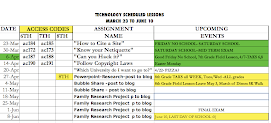
3) THIS WEEKS PROJECT-TECHCONNECT- "How to Cite a Site?"-
ACCESS CODES: ac184-6th grade, ac186-8th grade
Have your imovie updated today we will be watching on Thursday and Friday and grading each others work.

Friday, March 5, 2010

MONDAY & THURSDAY, MARCH 8, 2010


OBJECTIVE: I will continue working on my Imovie. I should have at least 30 combined
images and quotes.

ASSIGN YOURSELF: Homework for Technology color up your Study buddy get it organized for the next 9 weeks of work.

2) Your homework is to use each term create a sentence and draw a picture if you can.
These terms are already in your handouts from brainpop, so you do not have to write just glue stick to your study buddy!

TERMS
copyright-
creative work-
derivative
exclusive
tangible
infringement
fairuse
repurpose
parody
public domain
plagiarize
source
consequence
attribute
verbatim
quotation
footnote
endnote
bibliography
paraphrase


AGENDA:
1) Assign yourself (5 min)
2) Do Now- Brain pop to record notes in study buddy (20 minutes)
3) Imovie project- continue working you should have 20 images and 10 quotes that will be close to 3 minutes. (30 minutes)


Thursday, March 4, 2010

MARCH 4-5


OBJECTIVE:
1) I will review for IA today 10 minutes in "Win a Million"
2) I will work on my Imovie  after my exam.

ASSIGN YOURSELF:  NO HW

AGENDA-
1)DO NOW: Review  IA (10 minutes)
3) FINISH Powerpoint or work on Imovie

EXIT QUESTION: What was your grade for today's Exam? Did you study? How can you do a better job on next IA?

Sunday, February 28, 2010

MONDAY, MARCH 1-2

OBJECTIVE:
1) I will review for this week's IA today 30 minutes in "Win a Million"
2) I will work on my Imovie the last 30 minutes or finish powerpoint.

ASSIGN YOURSELF: STUDY ALL TERMS IN YOUR STUDY BUDDY!
IA WORTH 25% THURSDAY! Study each win a million!

AGENDA-
Take out Homework in Study buddy (10 sentences using terms from study buddy)
3) FINISH Powerpoint or work on Imovie

EXIT QUESTION: How will you prepare for this week's IA exam?

Wednesday, February 24, 2010


OBJECTIVE:
1) I will be assessed over the last 5 weeks terms that I did not understand.
2) I will finish my powerpoint in class today and post to my blog.

ASSIGN YOURSELF:
NEXT WEEK'S IA EXAM! Thursday!
Study each win a million! & USE YOUR STUDY BUDDY

HOMEWORK: Pick 10 different terms from your study buddy and create your own sentences. If you can draw a picture that would be great! Add color to your study buddy and get it organized! Remember EOY raffle for the $50 prize.


AGENDA
3) FINISH Powerpoint

Sunday, February 21, 2010

FEBRUARY 22-24, 2010, MON-WED

OBJECTIVE: I will re-learn these key concepts that I do not understand to prepare for this weeks quiz by using "Win a Million"

ASSIGN YOURSELF:
1) POWERPOINT ON YOUR DREAM COMPUTER DUE THIS WEEK! We will get back on track !

2) HOMEWORK- Write a sentence for every concept below in your studdy buddy. Use a picture if you can.

1. Hacker-person gains access into anothers computer without authorized permission
2. Cracker- malicious hacker
3. boolean search- AND, OR
4. Hacking is unethical
5. Modem- allows computers to talk to each other
6. PNG= screenshot = picture format
7. ZIP= COMPRESSED FORMAT
8. QTM, MPEG, AVI, = VIDEO FORMAT
9. XLS,CWK= SPREADSHEET FORMAT
10. MDB= DATABASE FORMAT
11. WAV= SOUND FORMAT
12. Boolean Search means using AND, OR to google search
13. RAM- Random Access Memory
14. ROM- Read Only Memory
15. CPU- It carries out the instructions of computer program
16. Output Device- A deviee that displays information in a way that is easy to understand
17. Input Device-
18. Audio card- It produces sound by transferring digital bits into analog audio
19. Monitor-draw a picture
20. Computer Interfaces- Operating systems for computers, MAC OSX, Windows, Unix


DO NOW: Win a Million!<--REVIEW IA#1. Click here to review for weekly quiz. (10 min)

AGENDA:
2) Discuss weekly quiz-
2)Techconnect-Glencoe- Next Weeks Project
6th grade -access code is: ac133
8th grade -access code is: ac189
PROJECT CHECKLIST

  1. Download images of the components and peripherals you want from these or other Web sites. (Peripherals arecomputeradditions such asscanners,printers,digital cameras, microphones, and speakers.) You can also search clip artfor appropriate images to include in yourpresentation.

    Use a
    presentation application to create your slide show. Create a titleslide using the following guidelines

  2. Include a creative title
    Use color and a large font to make your title eye-catching
    Add an appropriate graphic related to computer systems


  3. On slide 2, explain the purposes of the CPU andmemory. Include images or clip art showing the components.
  4. On slide 3, explain the purpose of input devices and list the input devices you want for your computer system. Include images or clip art showing the devices.
  5. On slide 4, explain the purpose of storage and list the storage devicesyou want for your computer system. Include images or clip art showing the devices.
  6. On slide 5, explain the purpose of output devices and list the output devices you want for your computer system. Include images or clip art showing the devices.

  7. On slide 6, list any other devices (such as communication devices) you want included in your computer system.

    Explain the purpose of each device.
    Include images or clip art showing these devices.
    Make new slides if you need more space.
  8. Throughout your slide show, use various font sizes, font styles, andfont colors.
  9. Check your presentation against the Checklist and revise as necessary & SAVE
EXIT CONCEPT CARD:  Spend the last 7 minutes creating a concept card using one of the terms for this week.   SEE SAMPLES
The 3x5 card should be 1) colored entirely and 2) have a picture, and 3) definition.